Gain multi-dimensional data insights, view key metrics by tag/platform, and directly grasp competitor content performance and user preferences.
How to View the Data Overview?
Step 1: Go to the Data Overview Page
Under the Competitor menu, select the secondary menu Competitor Tag Analysis, then open the Competitor Tag Overview page.
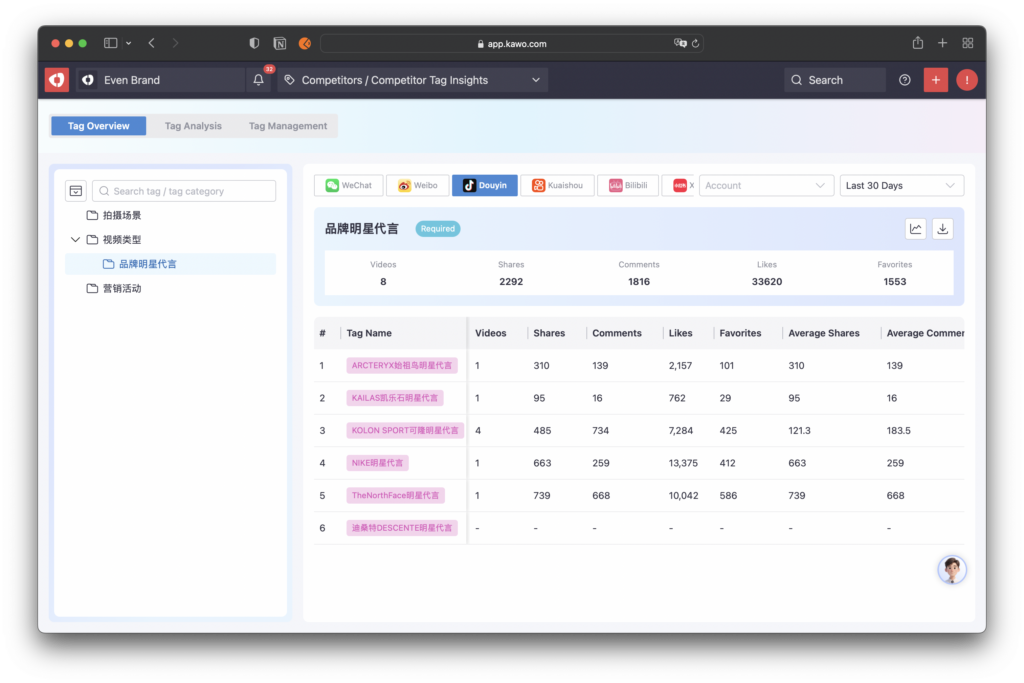
- On the left side, you can view all tag categories in a hierarchical structure. Click a tag category, and the performance data of all tags under this category will be displayed on the right.
- The system supports filtering tag data by platform. You can switch between platforms to view tag performance on the corresponding platform.
- The system automatically summarizes the data of all tags under a category. Click the analysis icon on the right to quickly generate an analysis report for tags in this category.
- n the data list, you can view the post count, engagement data, and average engagement data for each tag.


